The TikTok slideshow machine: automate a daily acquisition channel without filming anything
Every founder I talk to says the same two things about TikTok. "I know I should be posting there," and "I'm not going to film myself every day."
Both are correct. TikTok is still the cheapest attention around, and filming daily video is a part-time job. Scripting, shooting, editing, captioning. Most people ship four videos, get 200 views each, and quietly give up.
There's a version of TikTok that doesn't need a camera at all: slideshows, the photo posts you swipe through. They're cheap to produce and they perform absurdly well right now. Better yet, every step of producing them can be systematized, and almost nobody is doing it.
This is the full playbook I use. The first half works even if you do everything manually. The second half is how I automated it with Slidehook, the tool I built after months of doing it by hand.
Why slideshows, why now
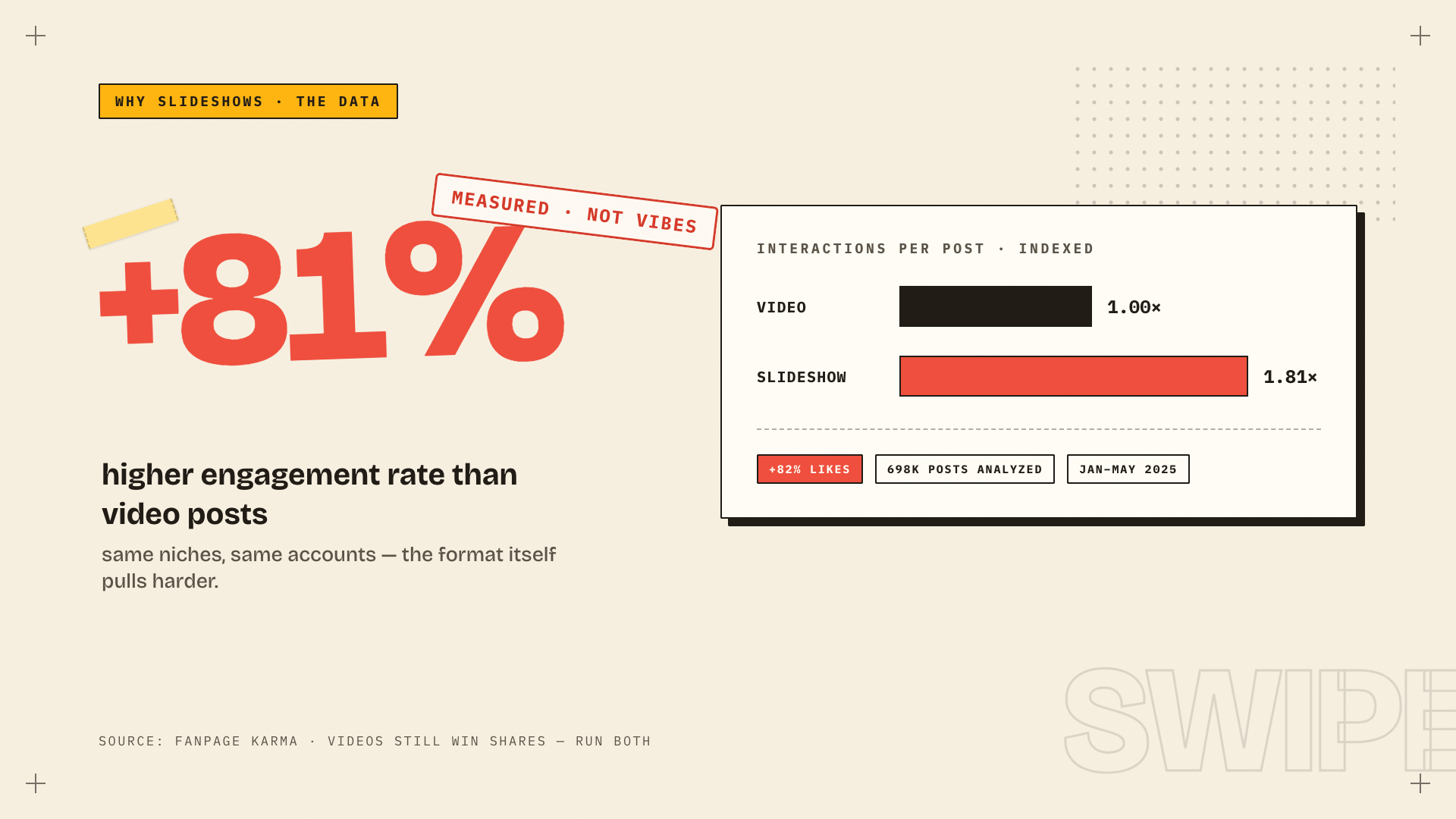
1. The data is lopsided. Fanpage Karma analyzed about 698,000 posts published between January and May 2025. On TikTok, photo carousels pulled an 81% higher engagement rate than comparable videos (1.81 times the interactions) and almost 82% more likes.
The trade-off, since you should know it before you commit: shares ran about a third lower than video, and raw reach was only 3% higher. Fewer people forward a slideshow. Far more people stop, swipe through it, and save it. If you're acquiring users rather than chasing virality for its own sake, that's the side of the trade you want. I broke the full comparison down in TikTok slideshows vs video.
2. The production asymmetry is enormous. A decent talking-head video costs you an hour or two. A slideshow is 3 to 6 images and about 150 words. Same slot in the feed, same shot at the For You page.
3. Swiping is a commitment device. A viewer who reaches slide 4 has actively engaged four times, and TikTok reads that as interest. A video can play passively in the background. A carousel has to be chosen.
4. They read as native. Polished video screams "ad." A slideshow with a sharp hook reads like a person sharing notes. For acquisition content that difference decides whether people save it or swipe past.
The catch: slideshows are a volume game. One slideshow is a lottery ticket. Thirty a month is a system that surfaces what your audience actually responds to. So the interesting problem was never "how do I make a slideshow." It's how you make thirty without it eating your life.
The loop behind every post
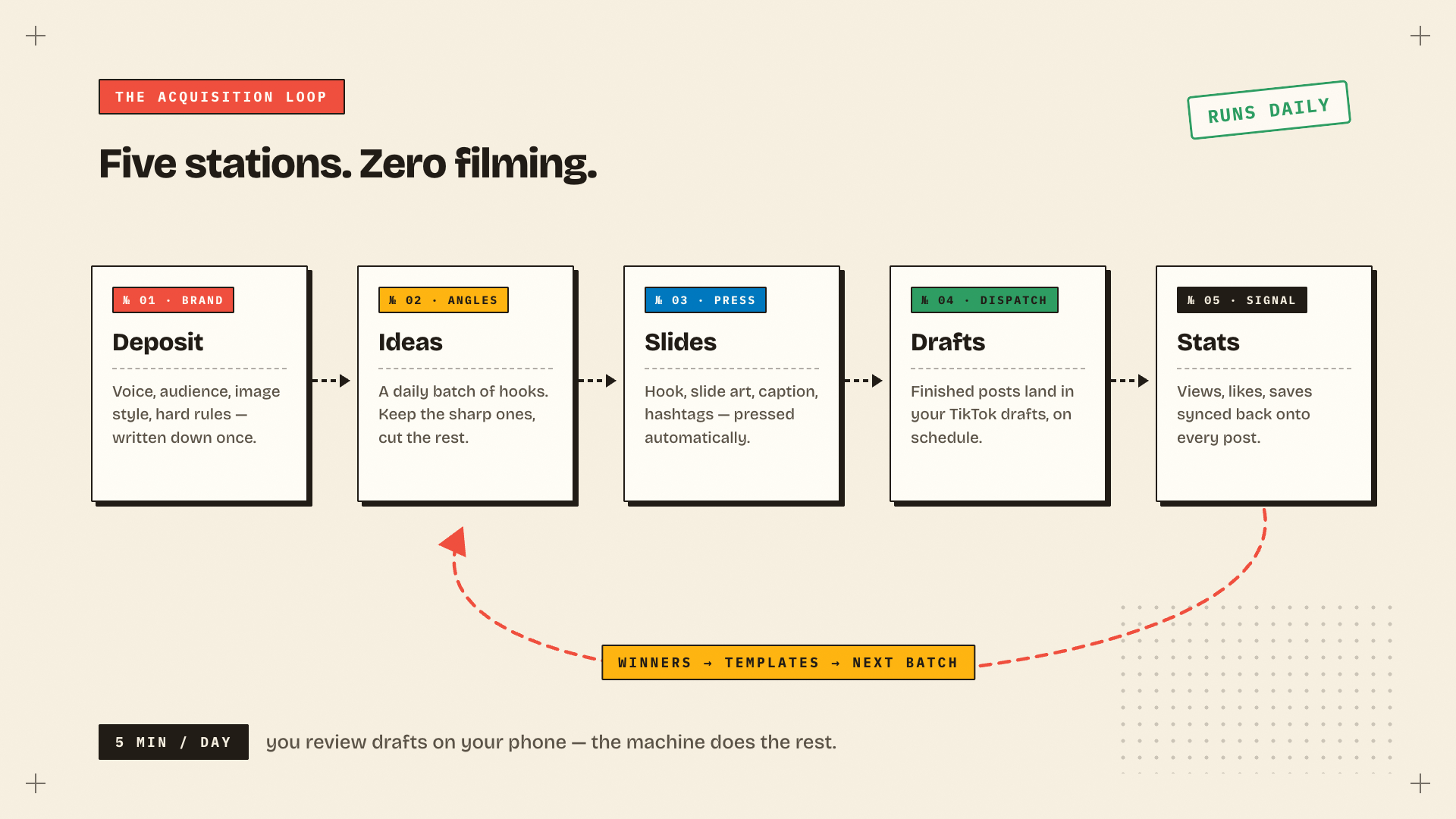
Every slideshow that performs goes through the same five stations:
- Brand deposit. Who you are, who it's for, what you sound like, what the images look like. Written down once.
- Ideas. A batch of angles and hooks. Most get cut.
- Press. Hook slide, body slides, caption, hashtags.
- Dispatch. The post goes out on a schedule instead of "when I remember."
- Signal. Views, likes and saves get recorded against each post, and the winners shape the next batch.
You can run all of this manually. A notes doc for the brand, a weekly ideation hour, Canva templates, a scheduling reminder, a spreadsheet for stats. I did exactly that for months, and when I was honest about it, each post cost me about 90 minutes. Worse, station 5 is the first thing you abandon when you get busy. That quietly kills the whole system, because iteration is the actual strategy.
Everything except final approval can be automated. Here's my setup.
The setup (about 20 minutes, once)
Step 1: create a studio
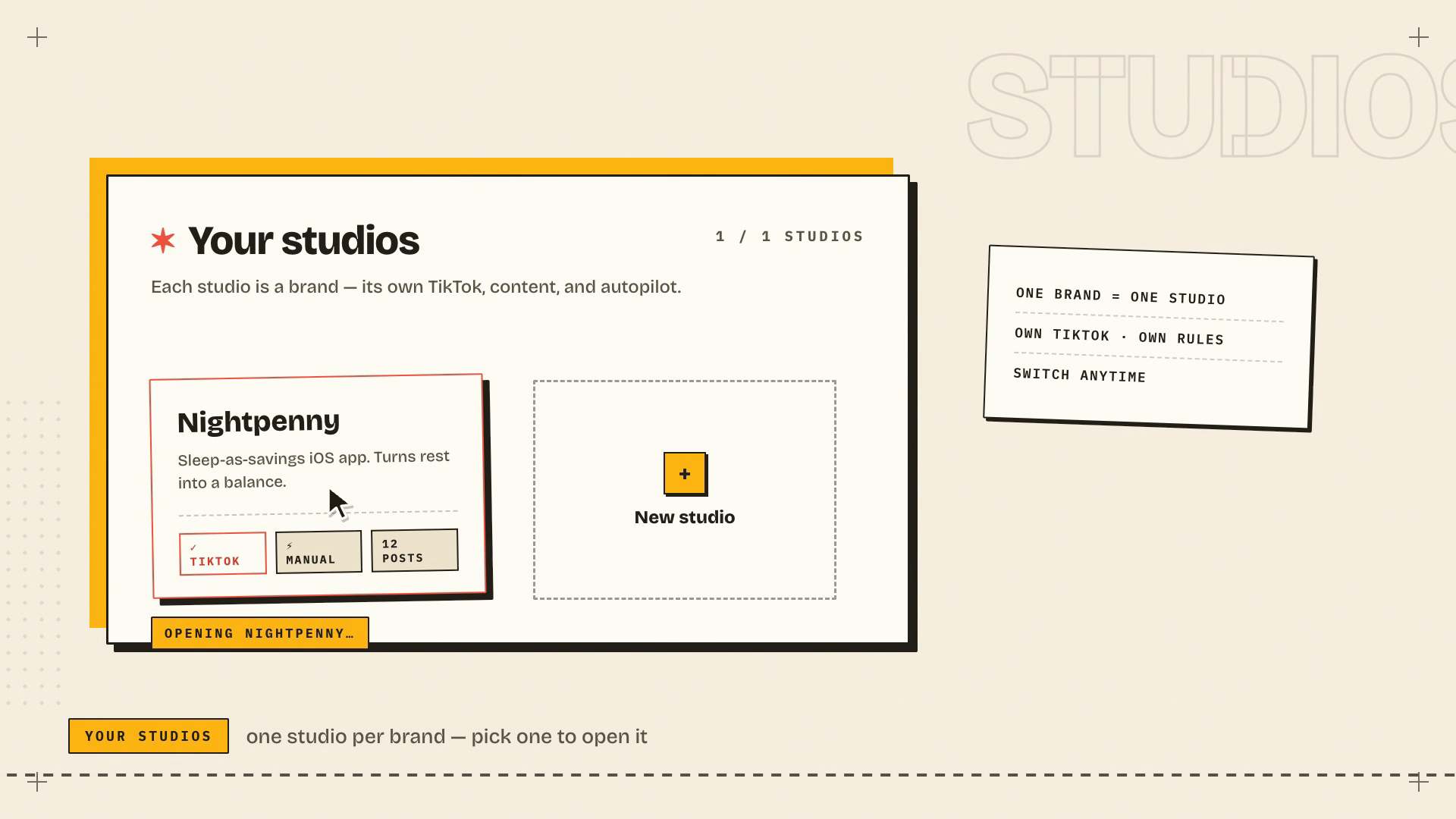
In Slidehook, one studio means one brand and one TikTok account, with its own voice, content queue and schedule. If you run multiple products, keep them isolated in separate studios.
The fastest start is "Start from a URL." Paste your landing page, hit Generate from URL, and it reads your site, writes your brand profile and drafts your first posts from it. Then go correct what it got wrong, which brings us to the step most people botch.
Step 2: write the brand brief like it's an investor memo
This decides 80% of output quality. The AI is exactly as generic as the brief you give it. The fields, and how to fill them so the output has teeth:
- What is the product? One sentence, mechanism included. Not "a finance app." Something like "an iOS app that locks your savings until 7am so you can't raid them during 2am impulse sprees."
- Target audience. Be uncomfortably specific. "Gen-Z who overspend on nights out" beats "young people interested in saving" every time.
- Brand tone / voice. Three adjectives plus a reference point. "Playful, punchy, a little edgy. Like a group chat, not a bank."
- Value props. One per line, phrased as outcomes ("see where your money actually goes") rather than features.
- Image style. This becomes your visual identity across every slide. "Moody night-time city, neon accents, cinematic" produces a coherent feed. Leaving it blank produces AI soup.
- Absolute rules. Hard constraints, always enforced, on text and images both. "Never show faces. Never promise returns. No finance jargon." Write down everything that would make you reject a post and you'll reject far fewer posts.
Ten minutes here saves a hundred edits later.
Step 3: connect TikTok
In studio settings: Connect TikTok, approve the OAuth screen, done. One account per studio.
One design choice matters here. Nothing auto-publishes to your feed. Every finished post lands in your TikTok drafts, and you open TikTok, review, and hit Post yourself. Your account never ships anything you haven't seen. If you want the full reasoning on why drafts-first is the safe way to automate, it's in how to automate TikTok posting without risking your account.
Step 4: feed the deposit space
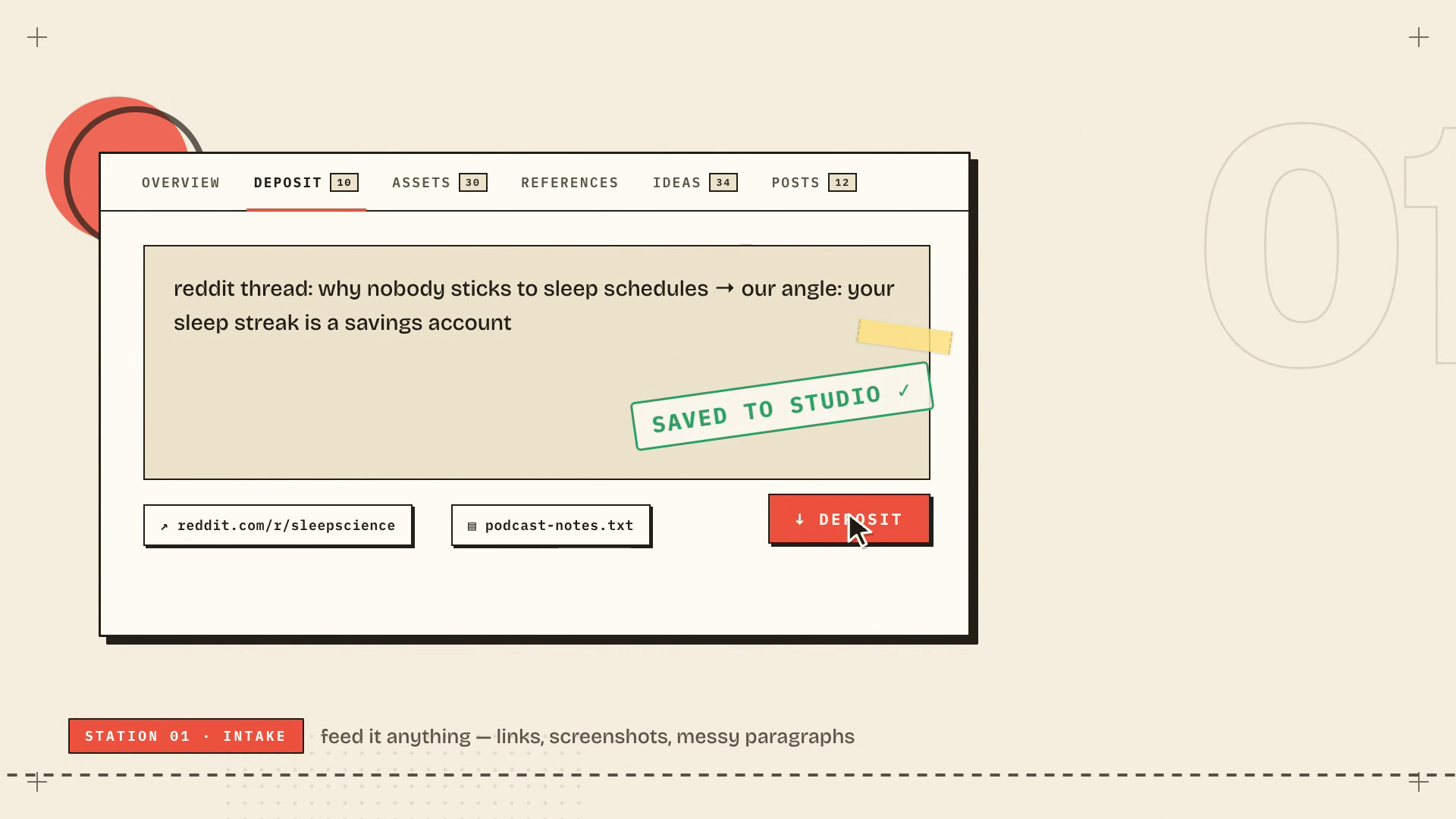
This is the unfair-advantage step. Each studio has a deposit space where you paste text, drop links or upload screenshots, and it analyses each one into raw material for ideas.
What to feed it:
- Reddit threads where your audience complains in their own words
- Competitor posts that popped, ideally with a note on why you think they popped
- Customer reviews, support emails, App Store reviews
- Your own notes, half-formed angles, podcast quotes
Ideas generated from real audience language consistently beat ideas generated from a product description. Five minutes of depositing per week is the highest-leverage habit in this whole system.
Step 5: generate ideas, kill most of them
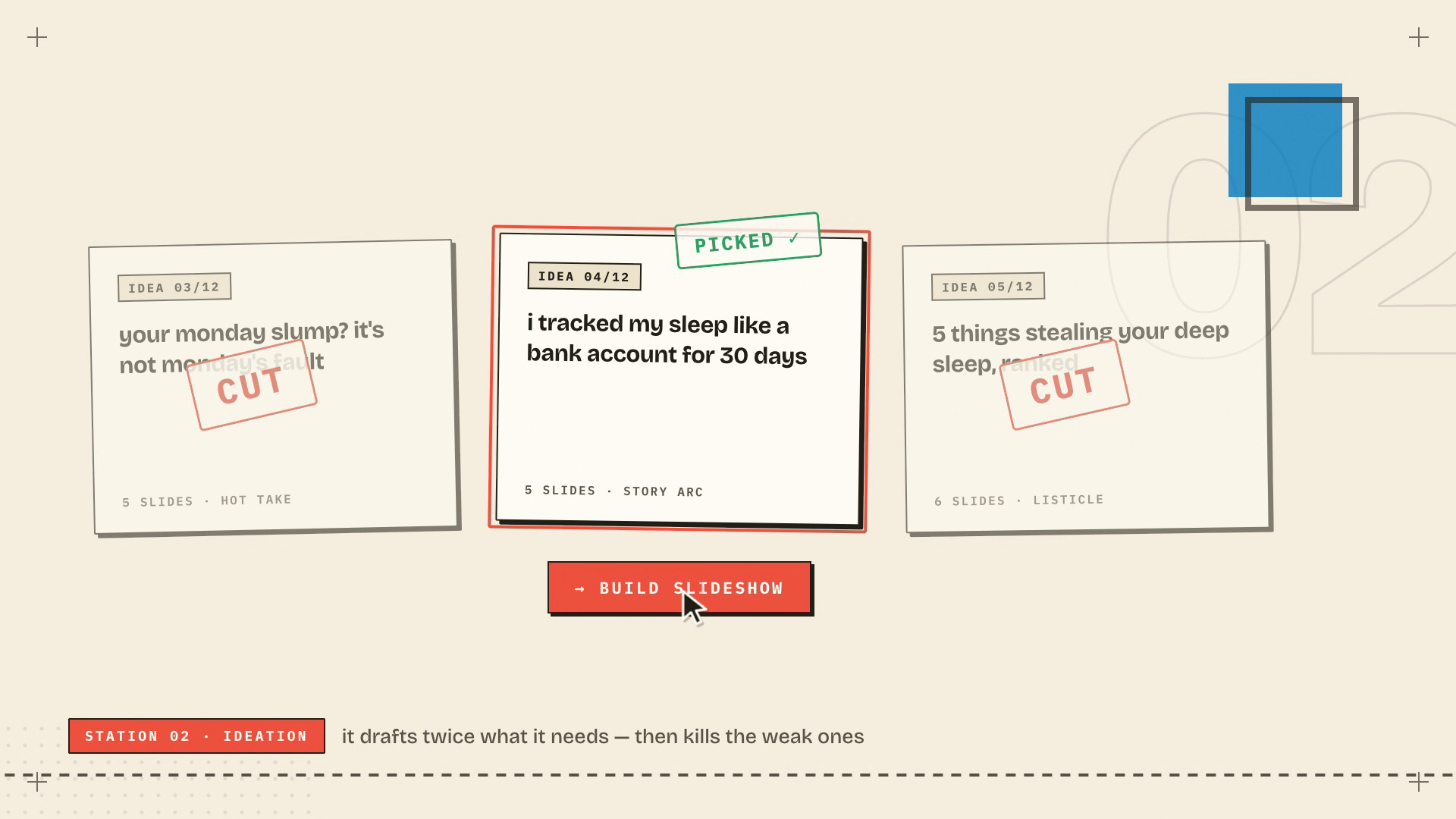
Hit Generate on the idea engine and you get a batch of angles, each one a hook, a concept and the reasoning, tagged with its structure (problem-agitate-solve, listicle, story arc, and so on).
Your job is editorial and it should be brutal. Keep the 2 or 3 where the hook makes you want to swipe. Cut the rest. A slideshow lives or dies on slide one; if the hook is mid, the prettiest slides in the world are decoration on a post nobody opens.
One Build Slideshow click turns a survivor into a full draft.
Step 6: press the slides
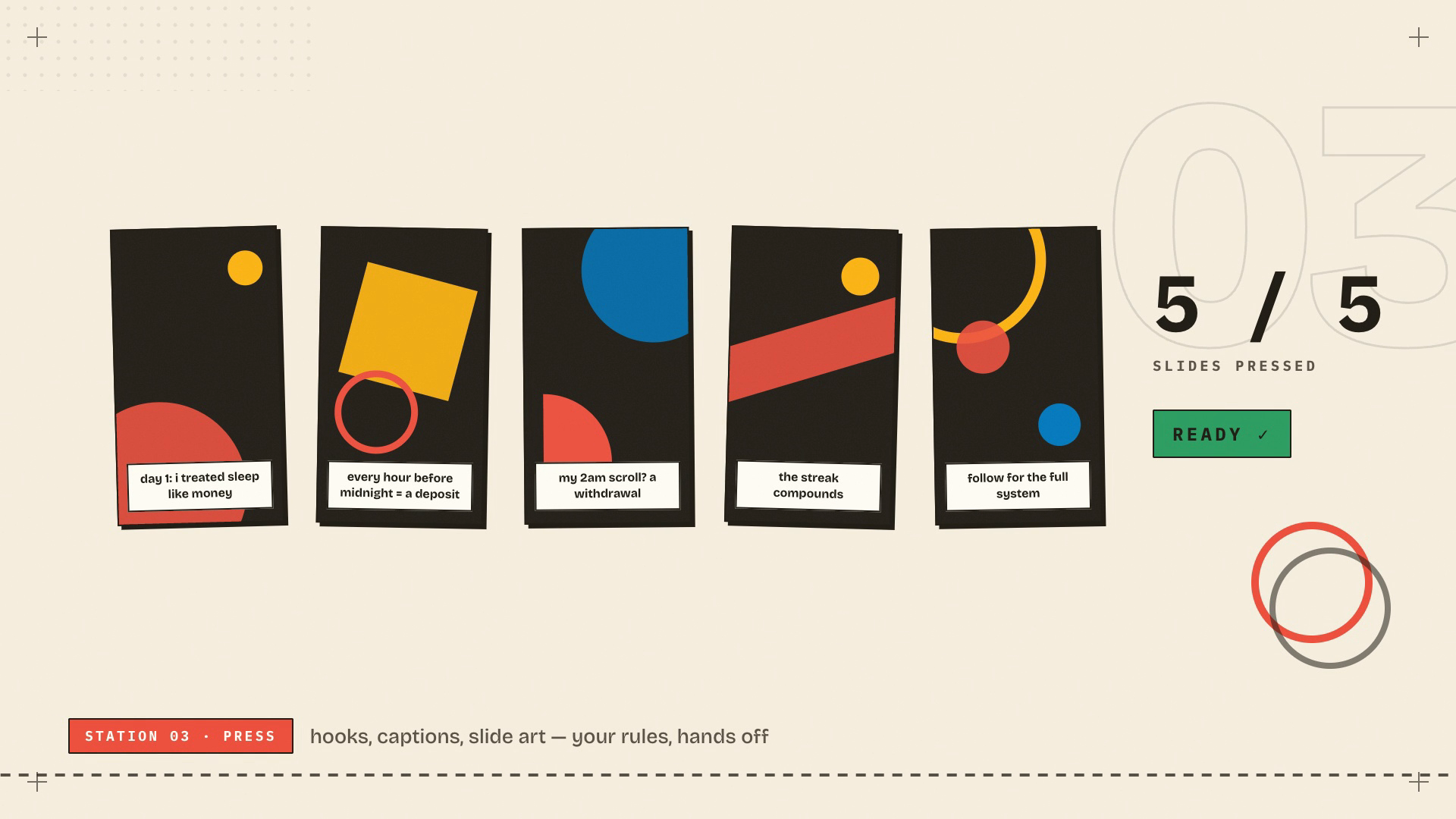
Each post comes out as a hook slide plus body slides, with caption and hashtags. The editor gives you the iteration handles that matter:
- Regenerate a single slide's image, or just its text, without touching the rest.
- Choose AI or stock per slide. Stock photos are free and sometimes look more native. Mix them.
- Micro-hooks: the small overlay cues that keep people swiping ("#3 is brutal," "save this") plus the CTA nudge on the last slide ("link in bio").
- An AIGC label for TikTok's AI-content disclosure, one toggle. Use it. Cheap insurance.
Touch what's weak, regenerate it, move on. You're an editor now, no longer a producer.
Step 7: schedule it, then turn on autopilot
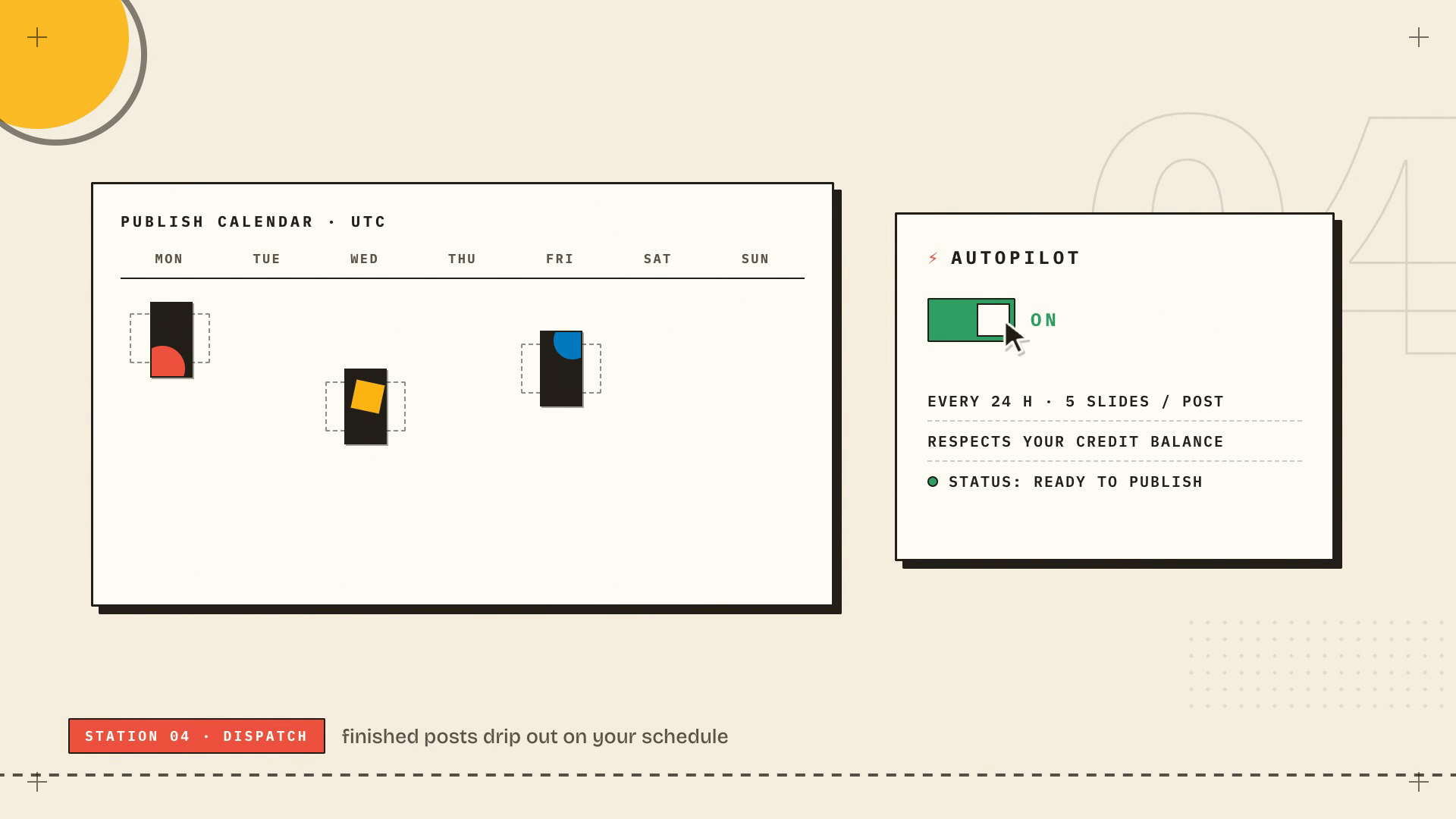
Two layers:
- Publish calendar. Weekly slots in your timezone. Ready posts drip out to your TikTok drafts on those slots, so consistency stops depending on your memory.
- Autopilot. The full loop on a cadence: it generates ideas, writes and safety-checks posts, makes the images, and drip-schedules everything to your drafts. It respects your image-credit balance and pauses when it's spent, and you still finalize every post in the TikTok app.
From here the machine runs whether you had a good week or not.
Your job now: five minutes a day
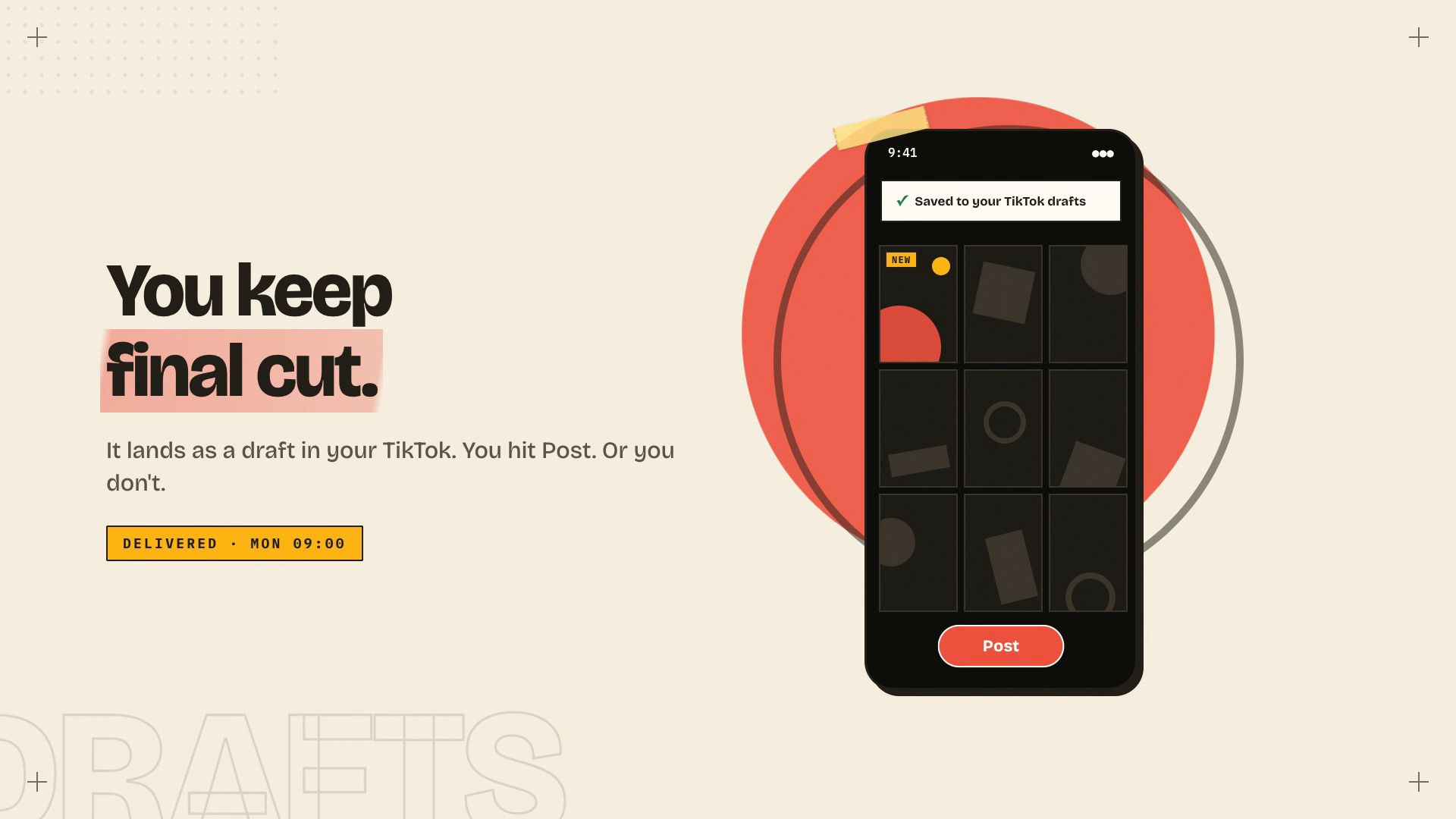
The daily routine: open TikTok, check drafts, post what's good, delete what isn't. That's the whole job.
I kept a human on final cut on purpose. It's the quality floor that stops an automated channel from drifting into slop, and it forces you to keep reading your own content, which feeds the next step.
Iterate like a media buyer
This section separates accounts that compound from accounts that stall.
Weeks 1 and 2 are calibration. Your first ten posts are buying data, and some will die at 200 views. That's the test working; 200-view duds are the cost of finding the hook that does 80,000.
Then run the loop weekly:
- Sync stats. One click pulls views, likes, comments and shares from TikTok onto each post. If you ship a link in bio, the generated landing pages track clicks too, so you're optimizing for acquisition instead of vanity numbers.
- Find the outlier and name the reason. "Post 7 did well" teaches you nothing. "The hook framed sleep as money and that tension stopped the scroll" gives you something to reuse. Wrong guesses are fine. Refusing to guess is how accounts stall.
- Make variants of winners. Make 3 Variants takes a winner and respins it: same skeleton, fresh hooks and slides. A winner is a format you haven't finished milking.
- Turn winning formats into templates. Drop a TikTok that worked (yours or anyone's) into References and it gets reverse-engineered into a reusable structure. The next idea batches get shaped to it. Proven format, your brand.
- Kill by category. If listicles keep losing to story arcs, stop generating listicles. Change angles and hooks. Changing font colors is procrastination with extra steps.
Volume is what makes this loop scientific. At 30 posts a month you're testing around 30 hooks monthly, while a solo video creator tests four. You'll simply find your winning format a couple of months before they do, and since every winner feeds the deposit space and the templates, the batches keep getting smarter. That's the compounding part.
What it costs
Doing this manually cost me roughly 90 minutes a post. The automated loop costs five minutes a day plus a weekly review.
Slidehook pricing maps to the AI images. Each AI-generated slide costs one credit; stock slides are free.
- Starter, free forever. 1 studio, 20 AI images a month, posts ship to your real TikTok drafts. Enough to feel the loop work. No card.
- Builder, $29/mo. 3 studios, 120 images (around 20 to 25 posts a month), 7 weekly slots, plus the conversion loop (short links and AI landing pages).
- Scale, $79/mo. 10 studios, 400 images, 20 slots, winner remixing, or bring your own Gemini key and generate without limits.
For reference, a single freelance slideshow post runs $30 to $60, and I priced out the full staffing menu (agency, freelance, DIY, automation) in what TikTok marketing actually costs. The free tier is the honest test: set up one studio tonight and judge the drafts that show up in your TikTok tomorrow. Full plan details are on the pricing page.
The short version
Slideshows beat video on engagement and cost a fraction of the effort, but only volume turns them into an acquisition channel. So stop crafting individual posts. Write a brand brief with real constraints, feed the machine your audience's actual language, generate ideas in batches and cut hard, let the slides press themselves, drip everything to your TikTok drafts on a schedule, keep final cut, and promote each week's winners into templates. Then give it 30 days before you judge it.
Frequently asked
Does Slidehook post to TikTok automatically?
No. Every finished post is delivered to your TikTok drafts through the official Content Posting API. You open TikTok, review the draft and hit Post yourself. Nothing ships to your feed unseen, which is also the quality floor that keeps an automated channel from drifting into slop.
How long does the setup take?
About 20 minutes, once: create a studio, write the brand brief, connect TikTok and feed the deposit space. After that the daily routine is roughly five minutes. Open your drafts, post what is good, delete what is not, and run a short stats review once a week.
Do TikTok slideshows really outperform video?
Fanpage Karma analyzed about 698,000 posts published January to May 2025. On TikTok, photo carousels pulled an 81 percent higher engagement rate than comparable videos and almost 82 percent more likes. Shares ran about a third lower, so the format favors acquisition over raw virality.
What does it cost to run this system?
Doing it manually costs about 90 minutes per post. Slidehook starts free with 1 studio and 20 AI images a month. Builder is 29 dollars a month for roughly 20 to 25 posts. For reference, a single freelance slideshow post typically runs 30 to 60 dollars.